
What is Feeling Thirsty?
Feeling Thirsty is a responsive cocktail recipe app that allows users to browse drink recipes and navigate to local stores to buy necessary ingredients.


I conducted interviews with four people in order to find out more about what they were looking for in a recipe app.
They wanted ease, simplicity, and aesthetically- pleasing design
They had difficulties shopping in person for ingredients
-
I have shown aisle numbers and quantities available / if the item is sold out
-
App will show photos and details of ingredients if clicked.
They felt that sorting recipes is important
-
I have sorted cocktails by their level of difficulty, the type of cocktail, liquor, and strength

My user research gave insight about what was most necessary for the design.


I created three user personas throughout my research. Each persona represents the target audience and includes a biography, their goals, and any needs or wants they may have.


Below are low and mid-fidelity wireframes.

I created two mood boards to show my creative direction for this design. The one shown below was chosen to keep the design simple, clean, and sophisticated.


The style guide created helps maintain consistency throughout the design and any further iterations in the future.


Browse
Sort by difficulty, type of drink, liquor, and strength. The search option
is also available with the ability to filter results by ingredients.


The filter allows users to select ingredients they already have
in their kitchen or narrow results even further with multiple
selections.
(Ex: Advanced Recipes - Tequila - Spicy - Strong - Rocks Glass)
Mix
Follow straight-forward recipes with specific information on the tools you will need, the proper glassware, and even garnishing suggestions.

Shop For Ingredients
An in-app checklist makes shopping a breeze. Nearby stores stocked with the ingredients you need are listed in the app showing their distance from your current location as well. If you need directions to the store, you will be redirected to Google Maps.
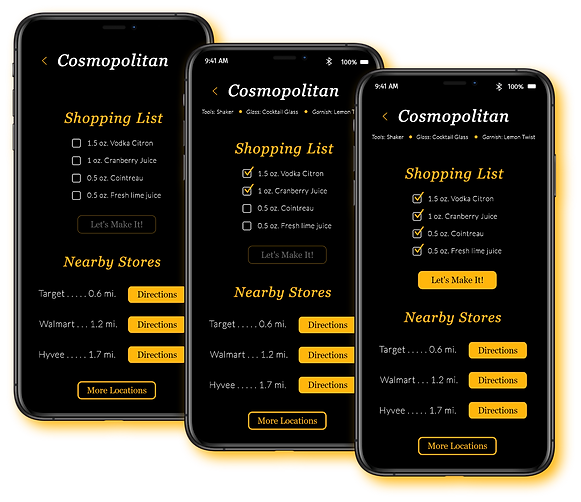


Once all ingredients are checked off, the
"Let's Make It!" button becomes available.
Clicking on Directions will take you out of the app temporarily to Google Maps for navigation.
Rate & Favorite
Rate each cocktail you make and add to your favorites list if you would like.


Heart icon becomes orange when clicked on and prompts you to rate the cocktail before saving to favorites.
How'd you like it?
How'd you like it?
Click on the amount of stars you want to rate cocktail. When selected, stars will fill orange.
Create Profile
Create a profile for a customized experience. Add your location,
mode of transportation, preferred liquor, and any allergies.

This design was made accessible for extra small, small, medium, and large breakpoints - adjusting each format as needed.


